


I have held off for writing this for some time for a couple of reasons.
There has been a lot of information shared recently about Obsidian and Claude - some of it I believe is great, some I believe is not so great. I wanted to make sure that I had a robust and thoughtful way of working that stayed true to my values, rather than contributing something brittle when there was a lot of hype happening and noise.
The last couple of months, I have been entirely focused on finding the best way to integrate Claude into my daily work to help me get more efficient at both my job but also writing and thinking.
I believe now though I am ready to share my workflow. I am pleased with how it is, the value it is bringing to me, and I don’t see this changing drastically in the near future.
Feel free to take inspiration, or use it in your own setup. This has been working very well for me - and I hope it will work well for you also!
Also - please ask any questions as a comment. I am more than happy to help, offer guidance or just chat about my workflow!
1. File Structure
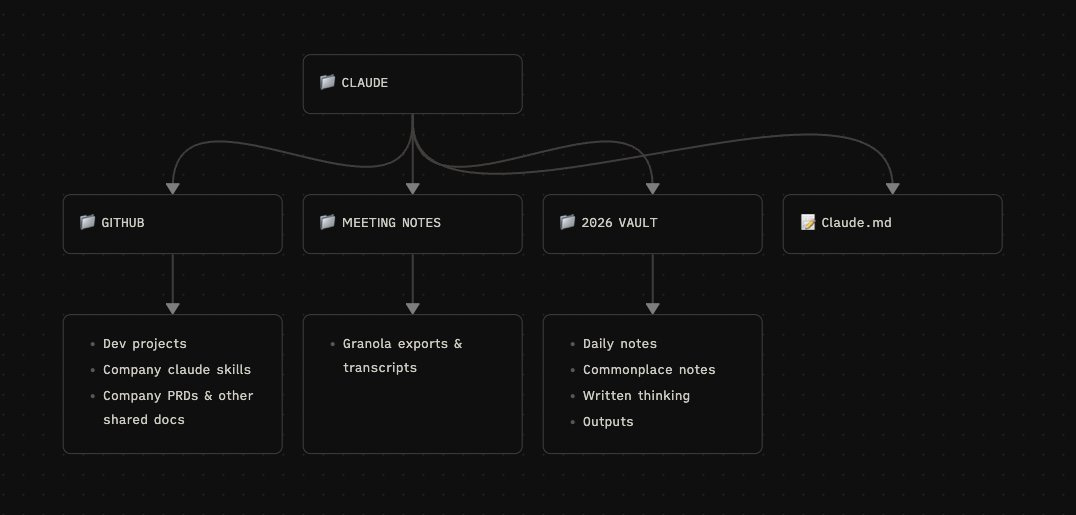
Initially, I started putting everything in to my Obsidian vault (meeting transcripts, generated files) however quickly realised this was not a good fit for me.
My knowledge graph was getting diluted by a lot of files/transcriptions - these are useful to speak with Claude about, but less useful to have visually in Obsidian. I try and keep a separation of concerns between notes that I have personally written, and things that are generated by AI.
I now have a dedicated Claude folder, which contains everything that I work with Claude on. There are three sub-folders:
Github
This contains both my personal codebases, work codebases and our company repository of skills/docs (affectionately named “Zkills”). Everything goes in there from PRDs, to customer research transcriptions to sales calls to Claude configuration files for our repositories.
I use Claude to parse a lot of this information, and reference company documents when making engineering decisions. This is becoming our default knowledge base over something like Notion - and through MCPs the flows are made much more efficient.
Example prompt: “Look at the latest PRD and create me a Linear project from the PRD. Create specific tasks for each stage”.
Meeting notes
I use a Raycast extension to export all of my Granola notes into their own dedicated folder. This has been really helpful in being able to use Claude to recall recent actions.
Example prompt: “I have a 121 upcoming with X person, what were the actions we took in our last meeting, and is there anything I need to do prior to our call?”.
Obsidian Vault
My Obsidian vault is where all of my writing happens. Daily notes, commonplace notes, written thinking, articles and social media posts. This is a practice I have been keeping now for the last six years with Obsidian specifically, and then before that other tools (Roam, Notion etc).
Claude has been ridiculously valuable when given access to all of this context, and has been transformational in how I think and write.
This article is about this section specifically. Let me dive deeper...
Key Takeaways
Setup a dedicated “claude” folder on your machine. All context lives within here.
Separate AI generated notes away from your Obsidian vault. This helps keep the vault/knowledge graph clean. Mass amounts of generated transcripts/notes in your vault is not actually that useful on the knowledge graph - however Claude having access to them is useful.
2. Obsidian Vault Structure
The main structure of my Obsidian vault has not changed with the introduction of Claude.
My ethos from starting to use Obsidian years ago has always to keep things as simple as possible - and I have found that this works well, especially when working with AI. My setup has not overly changed in the last six years, because it has been created around how I like to think and how I work.
Across my Obsidian vault I utilise three main forms of navigation: folders, tags and backlinks.
Folders
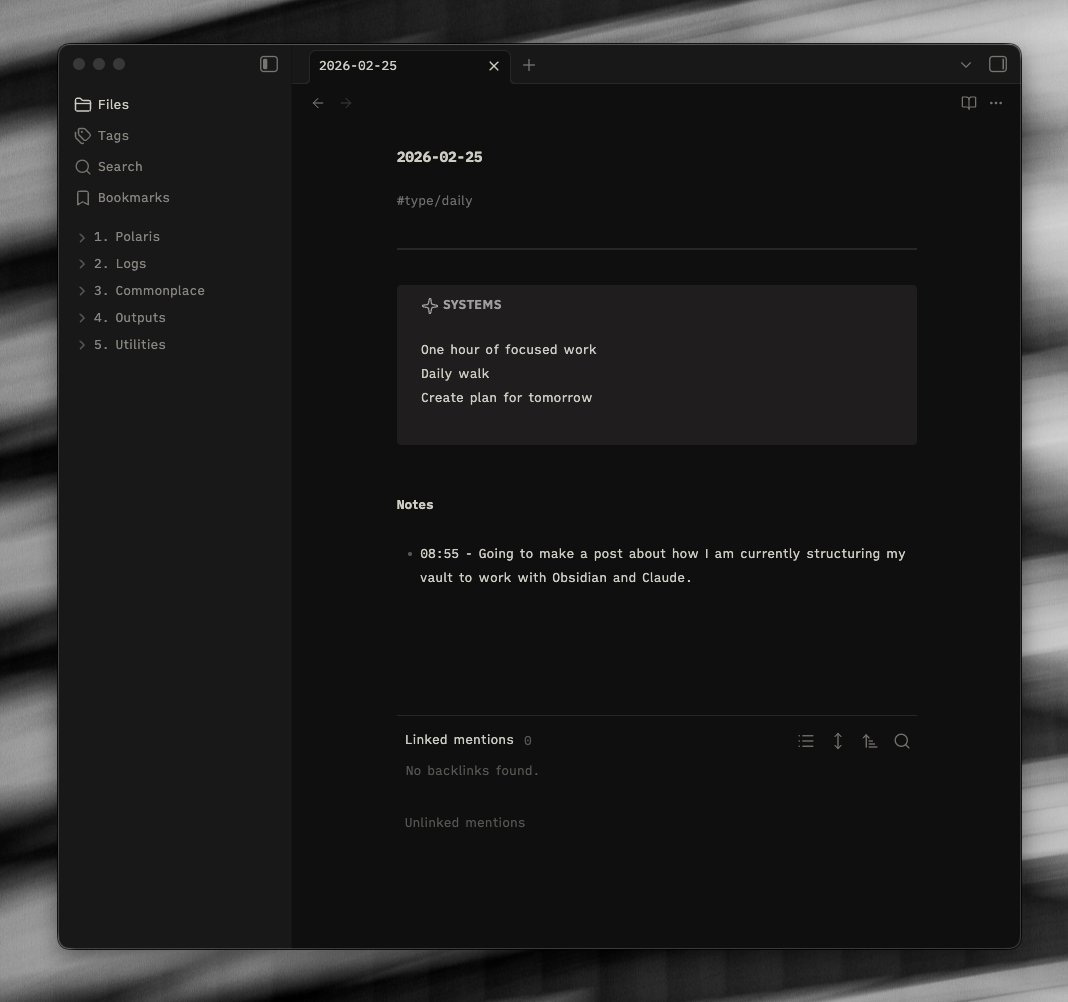
I keep my folder structure very simple. I have experimented with no-folders, but like this minimal folder setup.
As you can see from the lefthand sidebar, I have 5 folders:
Polaris
Polaris is my North Star section of the vault - this is where I keep my main goals, aspirations, “top of mind”, amongst other things.
This has been one of the biggest wins in terms of Claude efficiency, as it uses this folder as a guiding reference point for when it does my thinking. (More on this later).
Logs
This is where the daily notes live. I treat a daily note as a scratchpad, writing things down on the fly. An example can be seen in the picture above.
Commonplace
This is the main part of my vault. Lots of separate notes live in there, and each represent a different thought - staying true to the original concept of a “commonplace book”.
Outputs
This is where I do all my writing for things that are going to be shared - currently writing this in the Outputs section of my vault :)
Utilities
Bits that help the vault work - images, templates, canvas’, people etc
Tags
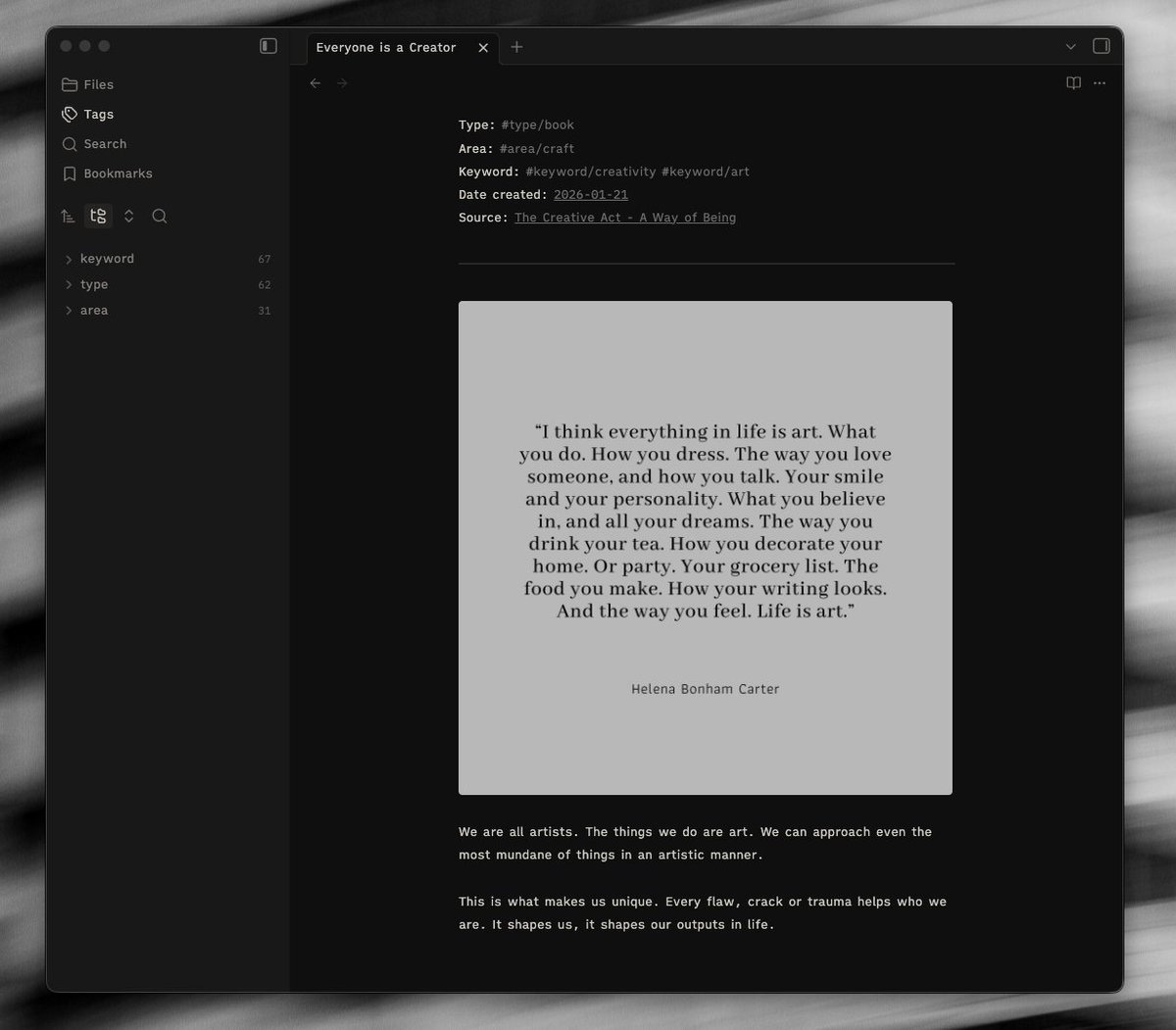
Tags is one of the most criminally underutilised ways of navigating through an Obsidian vault, in my humble opinion. I don’t see many people working in a similar way, and I think it is a shame.
Firstly, you can nest tags. Looking at the left sidebar above, in the tag pane I have “parent” tags, these can be opened and sub-tags kept within them.
Secondly, tags are very portable and keep with the “file over app” mentality. I have tried migrating my vault to other applications (Bear notes, as an example) and it works seamlessly.
Thirdly, tags works well with Claude. I can get more specific by prompting “look for notes within the articles tag” and it will filter them.
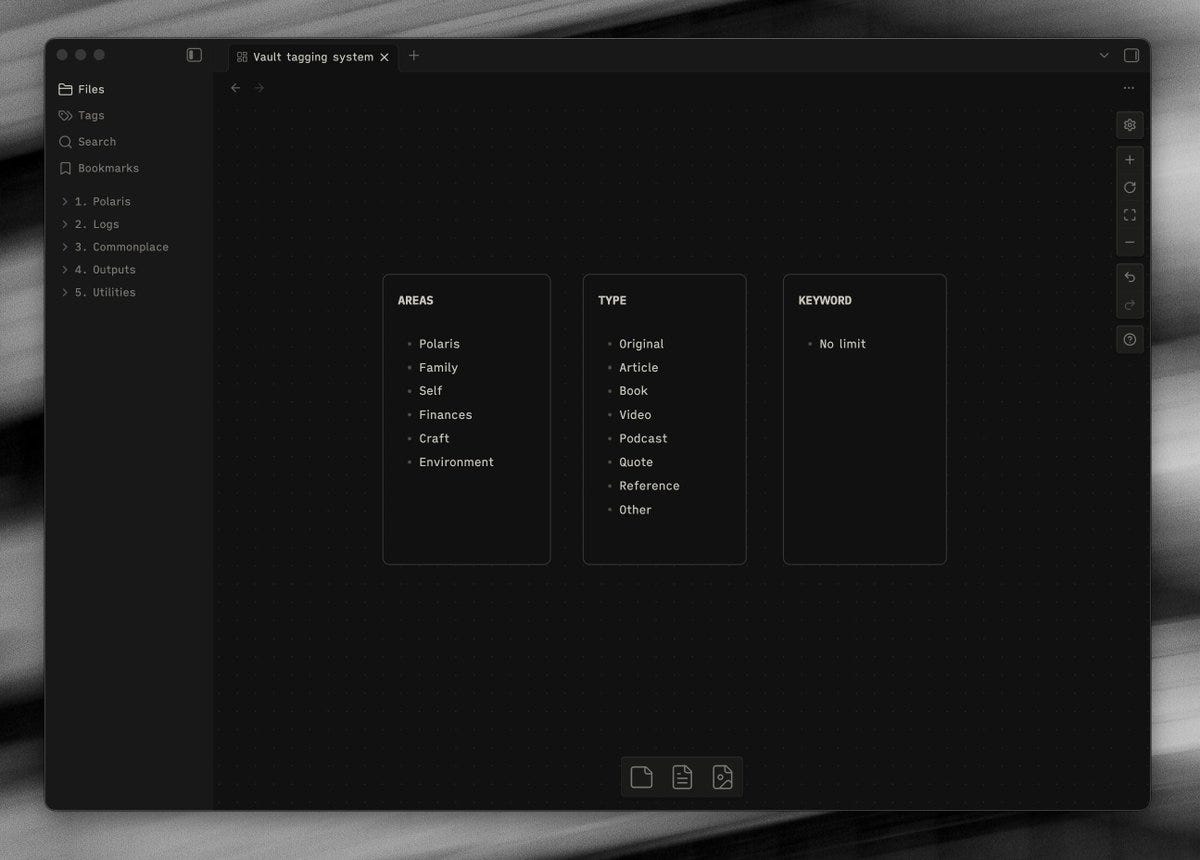
Each note I create has a set of tags that act as metadata at the top of them. Above is a screenshot of the tag structure as it currently stands.
Backlinks
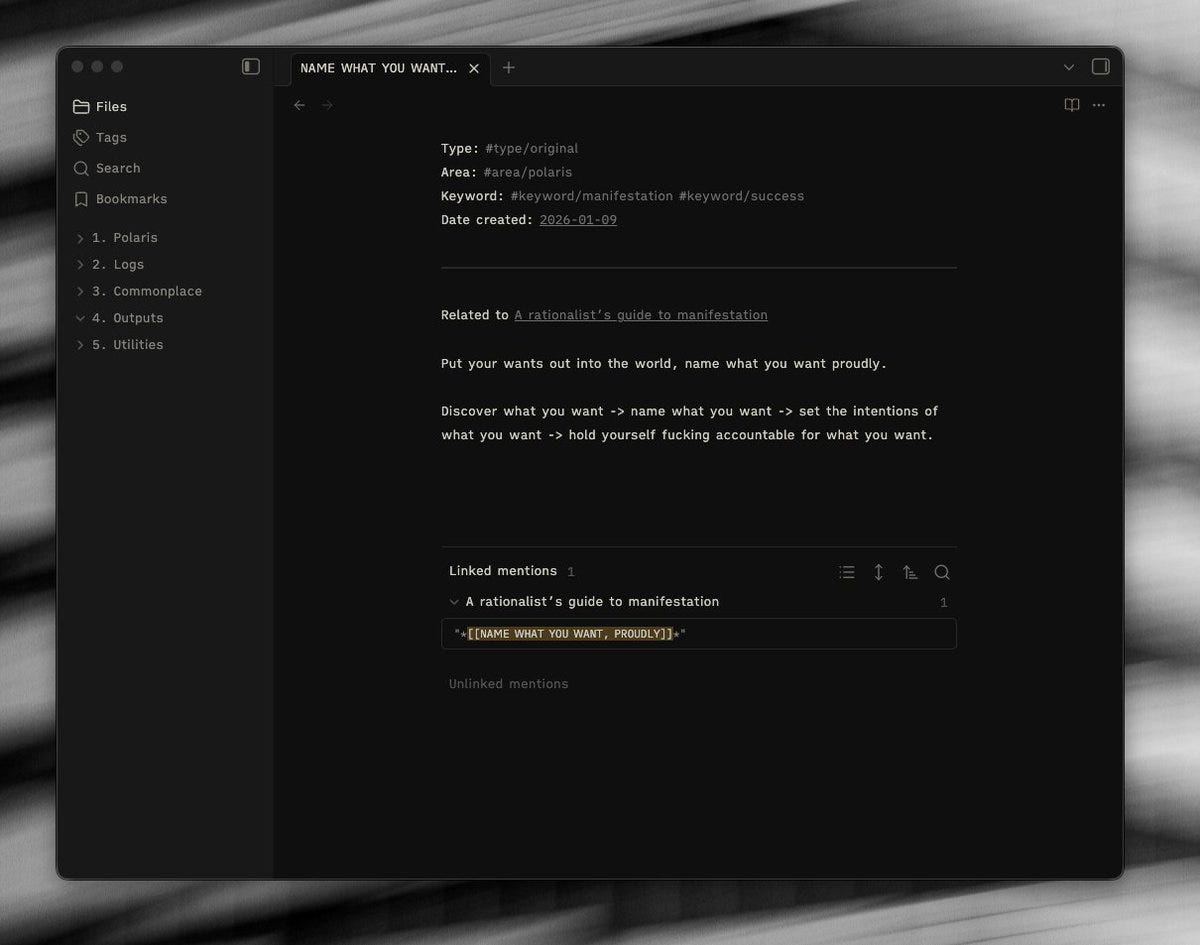
Backlinks are used to make connections manually between notes. It is a good way to leave trails for yourself to help with your thinking.
The example above is a note that I made when reading an article on manifestation. There were several ideas I took from this article, and I decided they warranted their own notes. Building a connection between the two means that original context is not lost.
Also - Claude is very good at suggesting backlinks and connections between notes that you might have missed. I have a command specifically for it.
Key Takeaways
Keep vault organisation simple and predictable. Ideally this is something that you pick and should work with for a long time without changing.
Tags are an under-utilised source of Obsidian vault navigation (in my humble opinion!). They work well natively, and with Claude!
Understanding how your vault is organised, can help you make Claude more efficient.
Claude is great at building connections and surfacing connections that you may have missed.
3. Using Claude with Obsidian
At first I was skeptical about how valuable this would be - but as time goes on I become more and more impressed just by how helpful Claude is for my own thinking and workflows. It continues to surprise me at how well it is able to build connections in my thinking, challenge my assumptions and prod at areas that I need to dig deeper into
One of my Favourite Examples
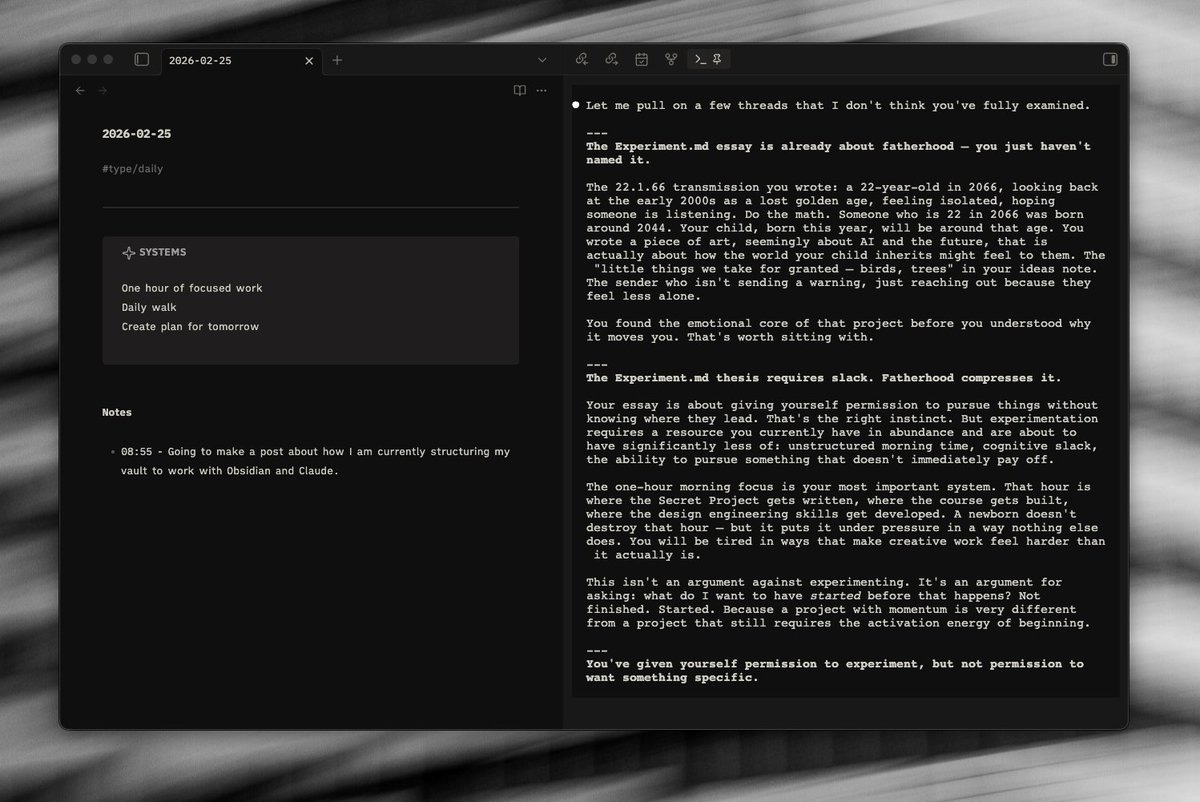
Recently, I found out I was going to be becoming a father for the first time. It’s been a long road - and this is a whole new set of emotions/thoughts for me. Everything I think of goes into my vault.. I write every little thought, idea, concern, anxiety down onto these pages - I have done this for years.
Claude picked up that whilst I wrote about everything, I didn’t write much about the thought of being a father - despite it being something that is top of my mind. It asked why that might be.
This was something I hadn’t picked up on - but it prodded a vulnerability that hadn’t even crossed my mind. Why was I avoiding those thoughts?
This is something it continues to help me with and it features heavily in my responses especially when speaking about.
In the screenshot above it flagged up a connection between a fiction writing project I have been working on. “Do the math”. It is getting snarky at my own emotional incompetence and naivety. 😆
Utilising “Top Of Mind” & “Polaris”
In my “Polaris” section of my vault, I keep everything that is important to me. One of those notes is “Top Of Mind”.
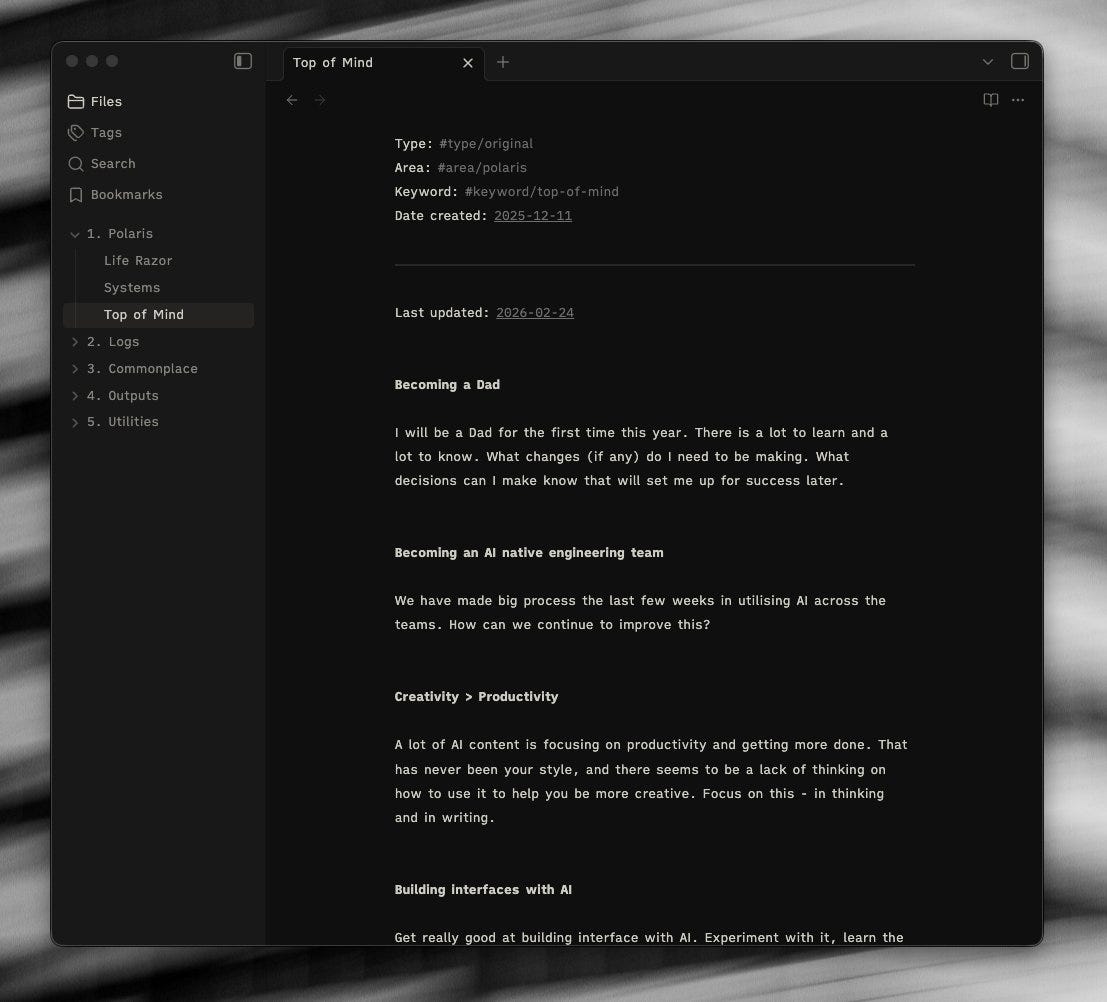
I can use this as a reference point for Claude to refer back to when I am thinking of anything new.. It holds me accountable for losing focus on things and chasing shiny objects.
This is a document that I update every couple of weeks generally - it has been really valuable for making Claude more focused and efficient. The descriptions don’t need to be long here at all, as long as the point is clear.
The Life Razor is a concept I picked up from Sahil Bloom - where your life’s mission is defined by one sentence. Coming up with this has been a valuable exercise it itself I have used Claude for - however, now I have this statement it is again really useful as a reference point.
Example prompt: “How are my current actions aligned with whats top of my mind?”
Example prompt: “I am thinking about taking on X opportunity.. How does this help or detract from my life razor?”
Idea Reports
I will likely do another post/article somewhen on some of the commands/prompts I have written for Claude specifically to use in Obsidian.. but one of my favourite is the “Idea report”.
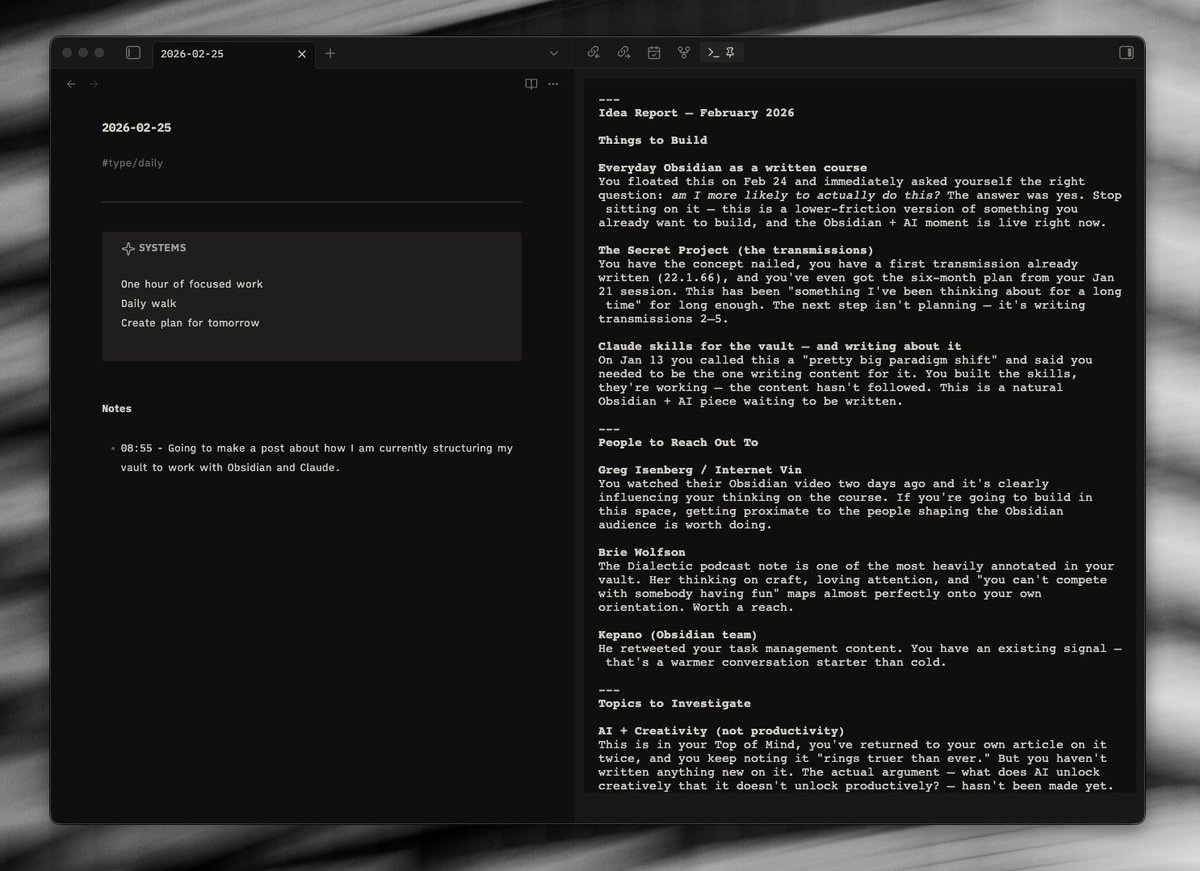
The prompt here is: “I have a few hours of spare focus time - what should I work on”?
This then breaks makes suggestions for different areas - things to build, people to reach out to, ideas to investigate or build on top of as well as actions that I may have missed.
It has the context of everything that I have been thinking about, and the output above you can clearly see the cross-referencing between my thoughts as well as other things I have been writing about.
Making Use of Vault Structure
Having a simple vault structure can make navigation much easier. An example is here below..
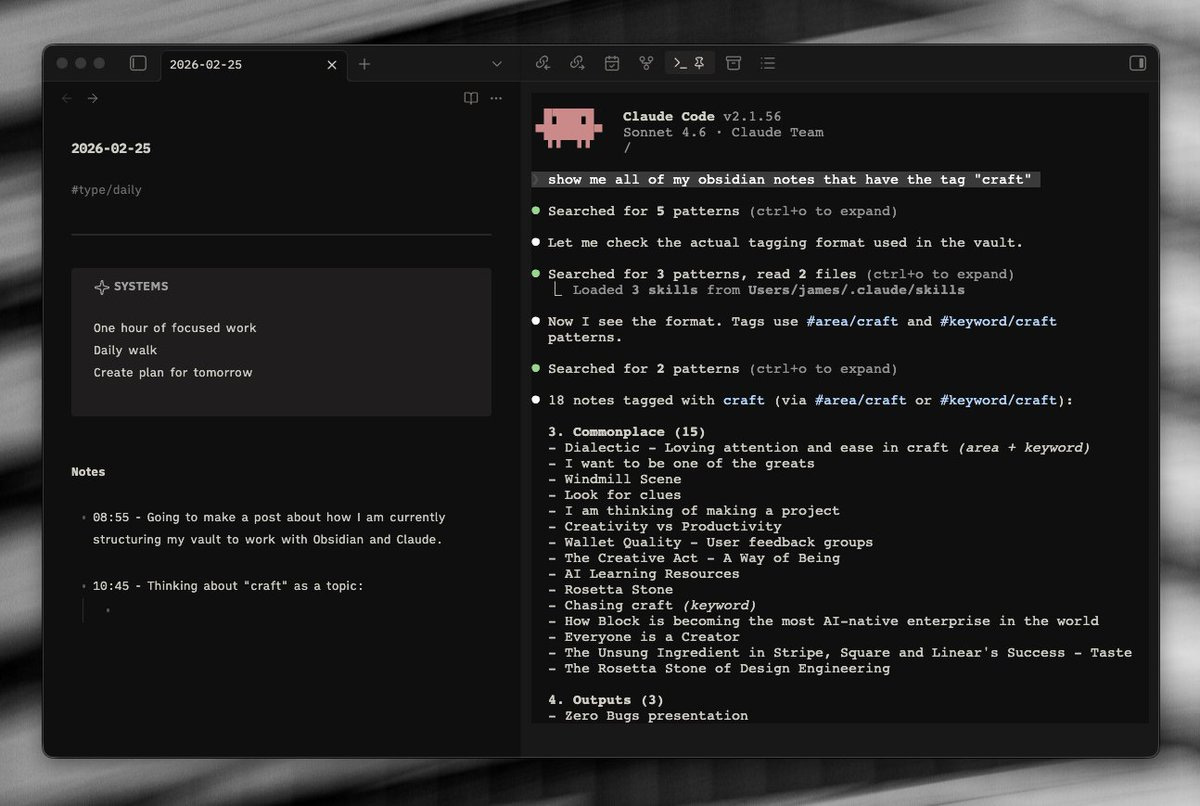
I am starting to write about “craft” as a topic, and I want to pick up the references from within my vault. I know I have a craft tag, so I can ask Claude to pick me up the files that sit within that tag.
Then, we can dive down on specific notes or look for specific themes across each of them.
Example prompt: “Show me all of my Obsidian notes that have the tag craft”
Example prompt: “Is there any connected ideas amongst these resources that would make an interesting topic to write about specifically?”
Key Takeaways
Claude performs incredibly well at looking for threads that haven’t been explored, and asking questions for deeper thought.
Introduce a “polaris” type document/folder - this should include what is top of your mind, goals, aspirations, personal values. Claude will reference this often and these principles help guide it’s thinking.
Create commands/prompts that are specific to your ways of working.
Keeping a simple vault structure will help the efficiency of Claude.
Conclusion
What I have found with Obsidian, pretty continuously over the last few years, is there is a lack of information that focuses very specifically on how to use it day to day. As a tool that provides little guidance and a lot of flexibility, it is very intimidating to get started.
There are great tutorials on how to build a specific thing, but never very many on how to build a workflow that covers everything. Or there are great tutorials for people doing a research job or that are studying full time.
Claude is another such tool, and it is becoming more and more challenging to find real world use cases amongst a barrage of hype.
Hopefully the above has given people a decent foundation for which to get started with Obsidian and Claude - two incredibly powerful tools.
In Obsidian how do you consistently get the top metadata area in notes?
Your post was very helpful. I have a question. What is the purpose of the commonplace folder? I would like to know where to save clipping notes or other people's writings.